Building an AI Homelab
As part of my job over the past year, I’ve been deploying and evaluating LLMs locally on various hardware setups. Naturally, I became well versed in the open source tools and models available and various hardware options. So I decided to build my own homelab for local inference.
My goal was to have a playground to try out different models, tools, and agent frameworks. Out of the hardware options available, I chose a Mac Mini M4 Pro for its balance of performance and power efficiency. It also fits nicely under my TV and can double as a media center.
All configuration files are available in my homelab repo.
Homelab Overview
Here’s a high-level overview of my homelab setup. I’ll go into more detail on each component later.

The Homelab is connected to my cloud VPS via Tailscale. On the cloud VPS, Traefik acts as a reverse proxy, forwarding requests to my Mac Mini over the Tailscale network. On the Mac Mini, Nginx proxies requests to various services running locally. Additionally, if a service requires authentication, it’s handled by Authelia on the VPS using auth_request.
The inference backbone is handled by llamactl, which manages multiple model instances using llama-server and MLX. The entrypoint for user interaction is AgentKit. There’s also an audio service for ASR and TTS using MLX models, and Glances for basic system monitoring.
How It Evolved
The first iteration of my homelab started with using Ollama and OpenWebUI. However, I quickly ran into limitations with Ollama, which led me to develop llamactl, which I detailed in my Llamactl article. Ollama is also not a great open source citizen as they build on top of llama.cpp without proper acknowledgment. More recently, they implemented their own engine, which still copies heavily from llama.cpp without attribution (even bugs).
OpenWebUI provided a decent interface but it felt quite opinionated and opaque. For example, they didn’t support model context protocol (MCP) servers and forced users to use their own MCP proxy MCPo. Their functions and valves system is interesting and could be powerful, but it’s opaque. Settings are duplicated and scattered, some for admin, some for user, which gets confusing for my single user instance. Their custom license is just the final nail in the coffin for me even if it makes no difference for my personal use case.
But, ultimately, the main motivation for me was to get a hands-on experience with LLM clients, tools and agents not hidden behind a shiny UI.
Smolagents Experiment
To understand how agents work, I started with the smolagents framework. It is quite simple and easy to understand by diving into the code. I started by creating a simple ToolCallingAgent and wrapped it in a basic chat loop. As I extended the loop with tool calls and more complex logic, I realized I was basically re-implementing the core logic of smolagents. For now, I kept the smolagents integration as is and went on to add MCPs.
AgentKit
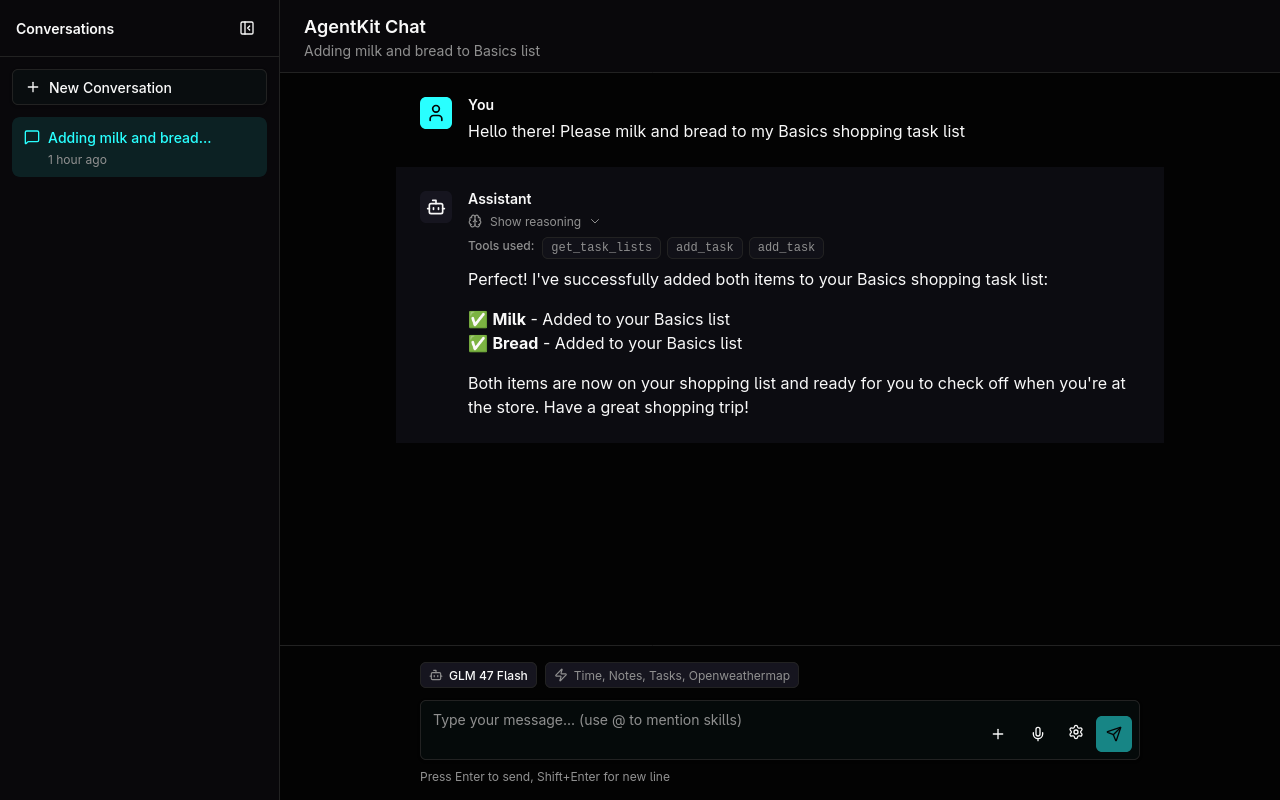
The basic chat loop I built on top of smolagents grew into its own thing that I named AgentKit (later found out the name is already taken by OpenAI). Over time I added more features like flexible AI providers, conversation memory, tool management, and plugins. When I started integrating MCPs, I ran into conflicts with how smolagents managed them. Since I had already built most of the core agent logic myself, I decided to remove the smolagents dependency entirely and complete my own simple agent framework.
MCPs
The Model Context Protocol (MCP) is an open standard that allows LLMs to integrate and share data with external tools and sources. Since it seems like it’s becoming a de facto standard, I wanted to add MCP support to my setup using the official Python SDK. All the guides focus on writing servers, which explains the literal thousands of vibe coded and abandoned MCP servers on GitHub.
The documentation on writing clients is comparably sparse. The recommended way seems to be initializing an MCP client and session per message, which seems quite heavy. After a few experiments I went with keeping a global session open for each MCP server and reusing it for multiple messages.
Audio Services
To add audio capabilities, I set up a Whisper ASR and TTS service using mlx-audio library. I created a simple FastAPI app that exposes OpenAI compatible endpoints for transcription and text-to-speech synthesis. The app loads the models on demand and unloads them after a timeout to save memory the same way as llamactl.
Monitoring
For monitoring, I set up Glances which provides a web interface to monitor system resources like CPU, memory, disk and network usage. It’s lightweight and easy to set up.
Tool Examples
Here are some example tools I’ve integrated into AgentKit:
- Task Tool: Uses CalDAV to manage tasks and todos.
- Notes Tool: Integrates with a git repository to manage markdown notes using Gitea MCP.
macOS Side Notes
Coming from a Linux background, setting up a homelab on macOS was an interesting experience. Here are some side notes:
- Homebrew is great for package management, but is nowhere near as comprehensive as apt or pacman
- Launchd is useful for managing services, but the capabilities are quite limited compared to systemd. For example, no easy way to set resource limits or dependencies between services. Starting and stopping services is also more cumbersome.
- Given that macOS is a Unix system, I was surprised to learn that Docker needs to run inside a Linux VM. This prevents me from using GPU acceleration for containerized workloads.
What’s Next
For now, I will mostly focus on adding more plugins and tools to AgentKit and refining the existing ones. I want to get the most out of local LLMs and specific tools and agents seem to be the way to go. I also want to expand monitoring and possibly add tracing, prompt management, and memory capabilities.
Recently, I’ve got Reachy Mini, a small open source robot. It seems like a perfect platform for building a voice assistant. It’s still sitting in its box disassembled, but I plan to integrate it with my homelab setup soon.